Added Google index data and filters
See whether our Google search found pages for a domain, filter by the number observed, and sort the results by that count.
We’ve added Google index observations to the catalogue. Alongside the Ahrefs metrics, you can now see whether our Google search found pages for a domain and how many matching pages were returned when we checked.
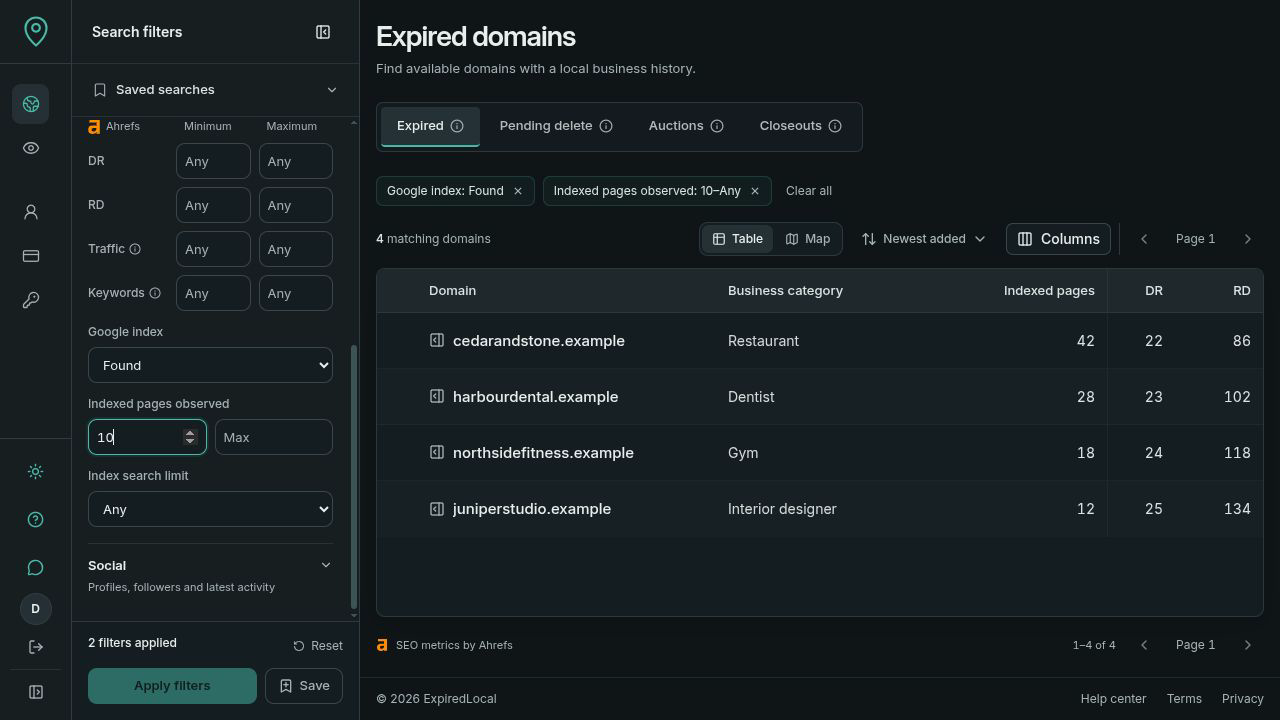
Pages found in Google
The Indexed pages column shows the number of matching pages we observed. You can sort it in either direction and filter by a minimum or maximum count. That lets you narrow a search to domains where we found pages, then compare them using your other criteria.
For example, you can combine a business category and country with at least ten observed pages. It gives you a specific group of domains to investigate alongside their review counts and referring domains.
What the count tells you
This is a record of a Google search, not an exact count of everything Google has indexed. The search can return up to 500 matching pages. A cap marker shows when it reached that limit; a result below the limit still isn’t a complete index total.
The filters distinguish pages found, no pages found, domains not checked and failed checks. A search that found no pages doesn’t prove a domain is deindexed. An unchecked domain has no count rather than a count of zero.
These observations reflect when the check ran. They give you another starting point for research, and you can check Google yourself when reviewing a candidate.
Use the same criteria with an assistant
The index filters and observed counts are available through the API and MCP too. A connected assistant can include them in a sourcing brief and compare the matches with the available business history and domain metrics.