Added state and region filters
Search across a whole state, province or region, combine several areas, or exclude the ones you don’t want.
You could already search by country and city. We’ve added state and region filters for searches that sit between the two. You can now look across Texas, Ontario or England without putting together a list of cities.
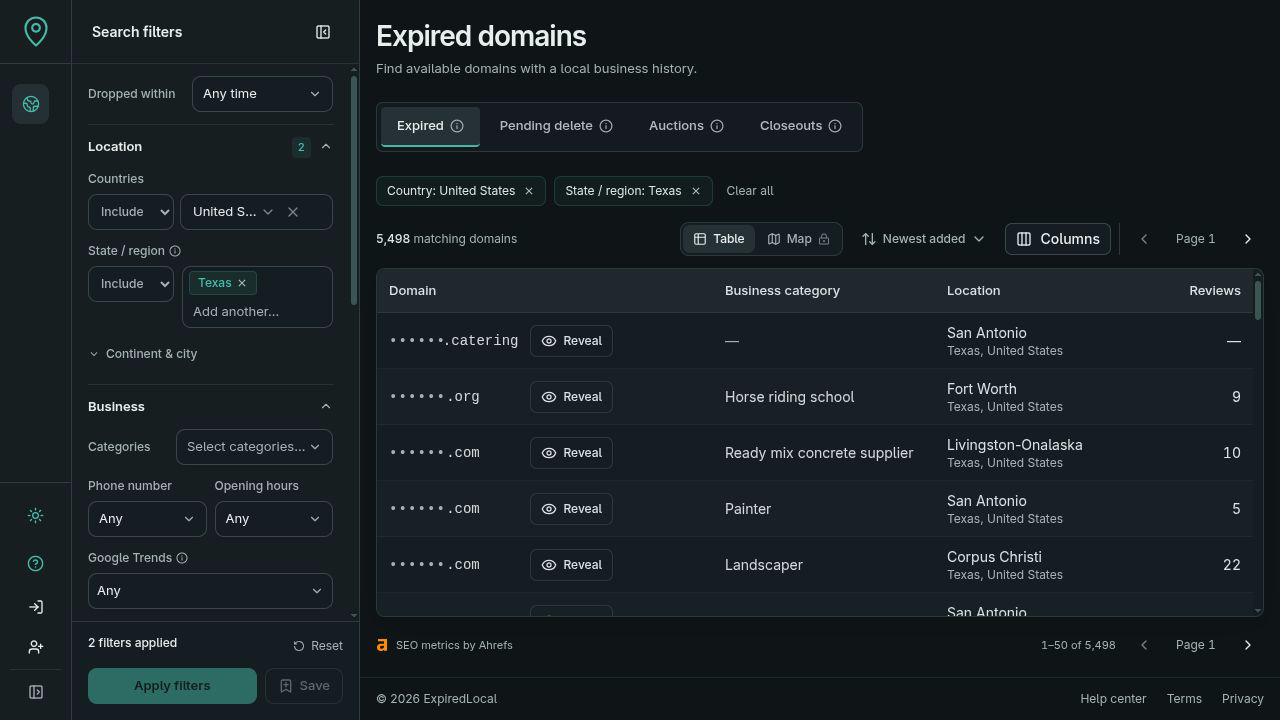
Search a whole state or province
The State / region filter narrows results to the business’s recorded state, province or equivalent region. It works with your country, category, review and domain metric filters.
If you’re researching plumbing businesses across Texas, for example, you can search that state as a whole. Smaller towns and cities stay in the search alongside the larger ones. The location column now shows the region with the city and country, so you can see where each result belongs.
Include several areas or leave some out
You can include more than one region in the same search. Texas and California will return businesses in either state, while your other filters still apply. Exclude mode leaves selected regions out of a broader search.
Use full names such as Texas rather than TX, and combine a region with a country when names overlap. Results depend on the location we have for the business; a domain without a recorded region won’t match a region you’ve selected to include.
Keep the same search across the workspace
Region filters work across expired domains, pending-delete domains, auctions and closeouts. They also carry into the map and your revealed-domain searches. Saved searches and shared search links keep the regions you selected, so you can return to that area with the current results.
Available through the API and MCP
You can use the same include and exclude choices through the API and MCP. A connected assistant can look for businesses across a state or province, then narrow the shortlist by category, reviews and the other research data in ExpiredLocal.